

Back to Articles Brooke Hughes•Jan 26, 2026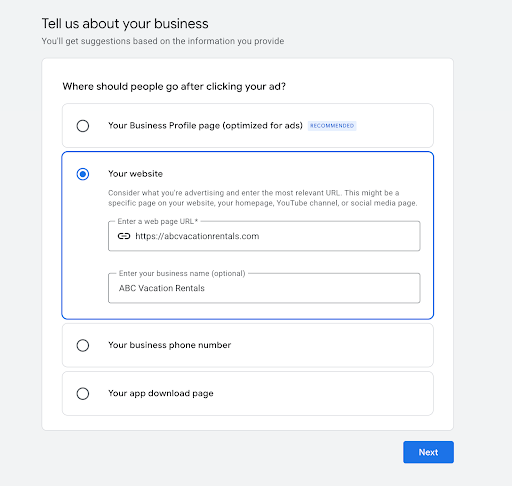
A Beginner’s Guide to Google Ads for Vacation Rental Booking Sites
Brooke Hughes•Jan 26, 2026Driving direct bookings is one of the biggest challenges for vacation rental businesses and property managers.
Online travel agencies and marketplaces dominate search results, SEO takes time to gain momentum, and paid listings on those where you can get listed often come with hefty commissions and fees that eat into margins.
Google Ads offers a different approach and one that’s perfectly suited to driving direct bookings.
Instead of relying on third-party platforms, you can put your own direct booking site in front of travelers at the exact moment they’re searching for somewhere to stay; and pay when someone clicks through to your site.
If you’re new to Google Ads, it can feel overwhelming.
There are multiple campaign types, bidding strategies, and settings, and it’s easy to waste budget by setting things up incorrectly.
This short guide strips Google Ads back to the essentials, focusing on what actually works for direct booking sites and what you need to know to get started.
You won’t find advanced tactics or complicated setups here.
Instead, we’ll walk through how Google Ads works, which campaign types to start with, how to choose the right keywords, and how to turn clicks into inquiries and bookings.
Why Google Ads Works for Direct Booking Sites
For most direct booking sites, the biggest challenge isn’t demand (for real), it’s visibility.
Large OTAs and marketplaces dominate organic search results, and while SEO is a powerful long-term channel and one that can absolutely work for direct booking sites, it can take months (or longer) to compete for high-intent and high-demand searches.
Google Ads offers a faster way to get in front of potential guests at the exact moment they’re actively looking to book.
When someone searches for terms like “luxury cabin in Aspen” or “beachfront vacation rental in Malibu”, they’re not browsing, they’re planning a stay. Google Ads allows your property or booking site to appear right at the top of the search results for these high-intent searches, even if you don’t yet rank organically.
Another key advantage of Google Ads is control.
You decide:
Which searches trigger your ads
Which locations your ads appear in
How much you’re willing to spend per day
What actions count as success (inquiries, availability checks, or bookings)
Unlike listing on OTAs and marketplaces, you’re not paying commission on every booking. Instead, you’re paying for visibility; and when set up correctly, that visibility can translate into profitable, repeatable direct bookings.
This guide is designed for beginners.
You don’t need previous experience with Google Ads, advanced tracking setups, or large budgets.
We’ll focus on the simplest, most effective way to get started using Google Ads to drive direct bookings.
How Google Ads Works (PPC Basics)
At its core, Google Ads is a pay-per-click (PPC) advertising platform. This means you only pay when someone clicks on your ad and visits your website, not when your ad is shown (there are nuances to this and you can set up some ad formats in this way, but let’s keep it simple).
With Google Ads, you choose the search terms (called keywords) and topics you want your ads to appear for.
When someone searches Google using those terms, your ad can appear at the top of the search results, above the organic listings.
If the searcher clicks your ad, they’re taken directly to your booking site.
What you pay per click depends on competition. Popular, highly competitive searches cost more, while more specific, location-based searches often cost less and convert better. For direct booking sites, this is a key advantage; you can focus on high-intent searches rather than broad, expensive keywords.
Google decides which ads appear, and in what order, using a combination of:
Your bid (how much you’re willing to pay per click)
Ad relevance (how closely your ad matches the search)
Landing page experience (how useful your page is for visitors)
This means the highest bidder doesn’t always win. Well-structured campaigns with relevant keywords and strong landing pages can often outperform competitors with bigger budgets.
For direct booking sites, success with Google Ads isn’t about driving as much traffic as possible. It’s about driving the right traffic; people actively searching for accommodation in your location and ready to book.
That’s why, throughout this guide, we’ll focus on search intent, relevance, and conversion tracking, rather than chasing impressions or clicks that don’t turn into real bookings.
Step-by-Step Setup: Your First Google Ads Campaign
Once you’ve decided to start with Google Ads, the next step is setting your first campaign up correctly.
The good news is you don’t need a complex structure or advanced settings to get results. Google’s setup process is now designed to guide you through the essentials, and when you keep things simple, you give both yourself and Google’s automation the best chance of success early on.
Below is how to work through Google’s campaign setup step by step, with a focus on driving bookings and inquiries, not just traffic.
Step 1: Add Your Business Information
The first step is to add your business name and website.
Google uses this information to understand what your business offers and to tailor recommendations during setup. If you already have other Google accounts, such as a Google Business Profile or a YouTube channel, you’ll have the option to link them at this stage.
Linking these accounts isn’t essential, especially if you’re just getting started, but it can help Google pull in additional signals and speed up setup if they’re already configured correctly.
If you don’t have them, or you’d rather keep things simple, you can skip this and continue.
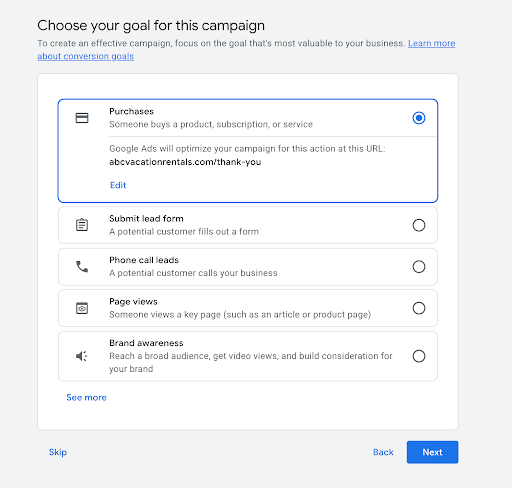
Step 2: Choose Your Campaign Goals
Next, Google will ask you to choose your primary campaign goal.
For most direct booking sites, this will be one of the following:
Purchases – if guests can complete bookings directly on your website.
Lead form submissions – if bookings are requested via an inquiry form and confirmed offline.
Avoid choosing goals like page views or brand awareness. These are too broad and encourage Google to prioritize traffic volume rather than people who are likely to book.
Your goal should reflect what actually matters to your business: bookings or genuine inquiries. Google uses this selection to decide how to optimize your campaign, so choosing the right goal here is critical.
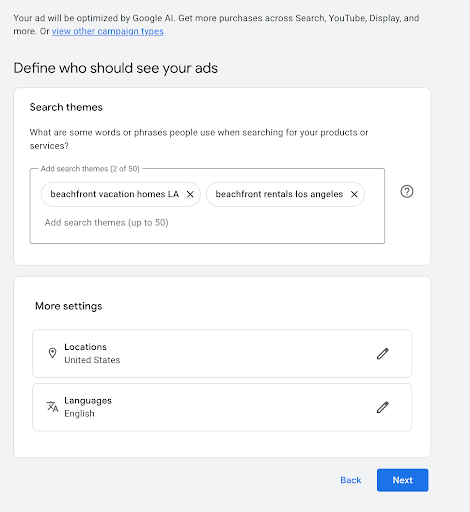
Step 3: Add Search Themes, Locations & Languages
Instead of asking you to choose keywords upfront, Google now asks for search themes; words or phrases that describe what people might search for when looking for your properties.
This is where intent matters most.
Focus on targeted, high-intent themes rather than broad ideas. Think in terms of:
Property type + location
Amenities + location
Booking-focused phrases
For example, “vacation rental in Malibu” or “pet-friendly cabin near Aspen” is far more valuable than something broad like “holiday ideas” or “places to stay”.
You’ll also set:
Locations you want to target (where your guests are searching from)
Languages your guests use when searching
A common mistake here is being too broad.
Narrowing locations and using realistic search themes helps keep costs under control and ensures your ads are shown to people who are actually able to book.
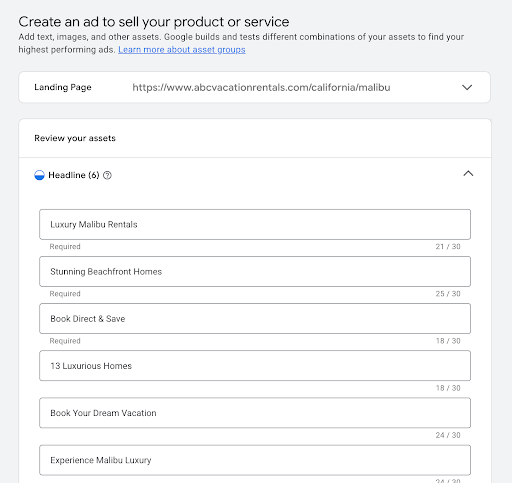
Step 4: Create Your Ads
Next, you’ll be asked to create your ads by adding assets, such as headlines and descriptions.
Rather than writing a single fixed ad, you’ll provide multiple headlines and descriptions. Google’s AI then tests different combinations and shows the versions most likely to perform well for each search and user.
When writing your headlines and descriptions:
Include the location where possible
Highlight a key differentiator (direct booking, amenities, flexibility, pricing transparency)
Use a clear call to action, such as “Check availability” or “Book direct”
You may also see options to add images, logos, or videos depending on your setup. These aren’t required to get started, especially if your focus is search intent, but you can add them later once your campaign is live.
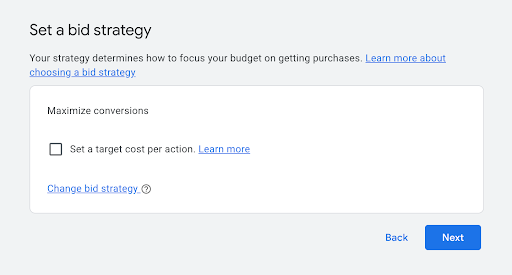
Step 5: Set Your Bidding Strategy
Google will then ask how you want to bid.
For beginners, and for most direct booking sites, Maximize Conversions is the best starting option. This tells Google to prioritize clicks that are most likely to result in bookings or inquiries, based on your chosen goal.
If you already have a good sense of how much a booking or inquiry is worth, you can optionally set a target cost per action. This gives Google a benchmark to aim for, but it’s not essential at the start.
If you’re unsure, leave this unset and allow Google some flexibility while it learns.
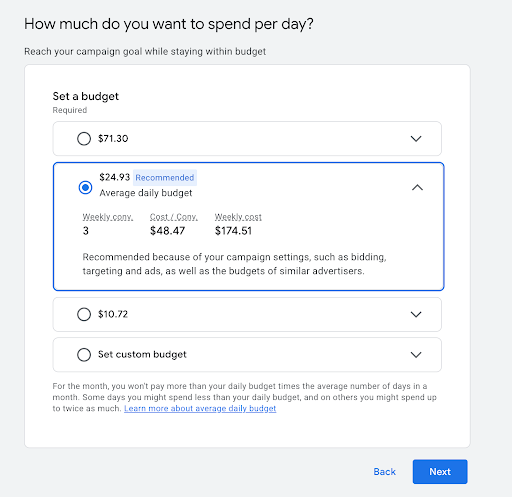
Step 6: Set Your Budget, Add Payment Details & Launch
Next, you’ll set a daily budget.
Google will often suggest a recommended budget, but this is only a guideline. Start with an amount you’re comfortable testing with rather than jumping straight to the recommendation.
What matters more than budget size is focus. A smaller budget targeting high-intent searches in specific locations will usually outperform a larger budget spread too thin.
You can always increase spend later once you see consistent bookings or inquiries coming through.
Finally, you’ll need to confirm your payment details and submit your campaign to go live.
Once launched, your ads can start appearing very quickly. Google will enter a learning phase as it gathers data and refines delivery, so performance may fluctuate at first; this is totally normal.
At this stage, don’t worry about perfect optimization. Familiarize yourself with the account, review performance weekly, and resist the urge to make constant changes.
Yes, there’s more you can do, but this setup is all you need to get started.
Before moving on, there’s one more important piece to cover: your landing pages. Even the best-targeted ads won’t convert if the page visitors land on doesn’t support the booking decision.
Landing Pages That Turn Clicks Into Bookings
Driving traffic with Google Ads is only half the equation. If your landing page doesn’t match what a searcher is looking for, even the most well-targeted ads will struggle to convert.
One of the most common mistakes direct booking sites make is sending paid traffic to a generic homepage. Avoid this at pretty much all costs.
Homepage content is usually designed for presenting top-level information on a business, not decision-making.
When someone clicks a Google ad, they should land on a page that immediately confirms they’re in the right place and makes it easy to take the next step.
A strong Google Ads landing page for direct bookings should include:
Clear, relevant information
The page should closely match the search that triggered the ad. If someone searched for a “beachfront vacation rental,” they should immediately see that reflected in the headline, imagery, and copy.
High-quality imagery
Photos play a huge role in booking decisions. Use clear, professional images that showcase the property, key amenities, and surroundings. This helps build confidence quickly.
Availability and pricing signals
Visitors shouldn’t have to hunt for availability. Whether it’s a calendar, a price range, or a clear “Check Availability” button, make the path to making a booking an obvious one.
Trust and reassurance
Reviews, testimonials, cancellation policies, and “book direct” messaging all help reduce hesitation; especially for first-time visitors who don’t yet know your brand.
A clear call to action
Every landing page should have a single, primary goal. For Google Ads traffic, this is usually:
“Check availability”
“Book your stay”
“Request availability”
Keep your CTAs clear and to the point.
Mobile experience is especially important. A large percentage of paid search traffic comes from mobile devices, so make sure images load quickly, buttons are easy to tap, and booking forms are simple to complete on smaller screens.
When ads, keywords, and landing pages are tightly aligned, conversion rates improve; and costs per booking usually fall.
Lastly, we’ll look at what to do once your campaign is live and how to optimize performance without constantly tweaking every setting.
Further Reading & Learning
If you want to learn more about taking your Google Ads account to the next level, after launching it, Google’s own ‘guide to Google Ads’ is a great resource.
Frequently Asked Questions
How much budget do I need to get started with Google Ads?
There’s no fixed minimum budget, but it’s best to start with an amount you’re comfortable testing with. What matters more than total spend is focus. A smaller budget targeting high-intent searches in a specific location will usually outperform a larger budget spread too thin. Start small, monitor results, and increase spend once you see consistent inquiries or bookings.
How long does it take to see results?
Google Ads can start driving traffic as soon as your campaign is live, but meaningful results usually take a little longer. Most campaigns need a short learning period while Google collects data and optimizes delivery. In many cases, you’ll start seeing clearer performance trends within a few weeks, depending on search volume and budget.
Can Google Ads work with a small direct booking site?
Yes. In fact, smaller sites often perform well because they can focus on very specific locations, property types, or amenities. You don’t need to compete with large OTAs on broad terms; targeting niche, high-intent searches is often more profitable.
Is Google Ads worth it compared to OTAs?
Google Ads won’t replace OTAs overnight, but it gives you more control and helps reduce reliance on commission-based platforms over time. Every direct booking you generate improves margins and builds a stronger relationship with guests.
You may also like



Download the app
By signing up, you agree to our Privacy Policy and Terms of Service.